The Auto Terms feature in TaxoPress can be resource intensive because it does need to scan your content.
We recommend being careful when running Auto Terms on a large site. We have safeguards in place so you can run Auto Terms without causing time outs on your site or server. If your site has more than 1000 posts, please consider using these safeguards.
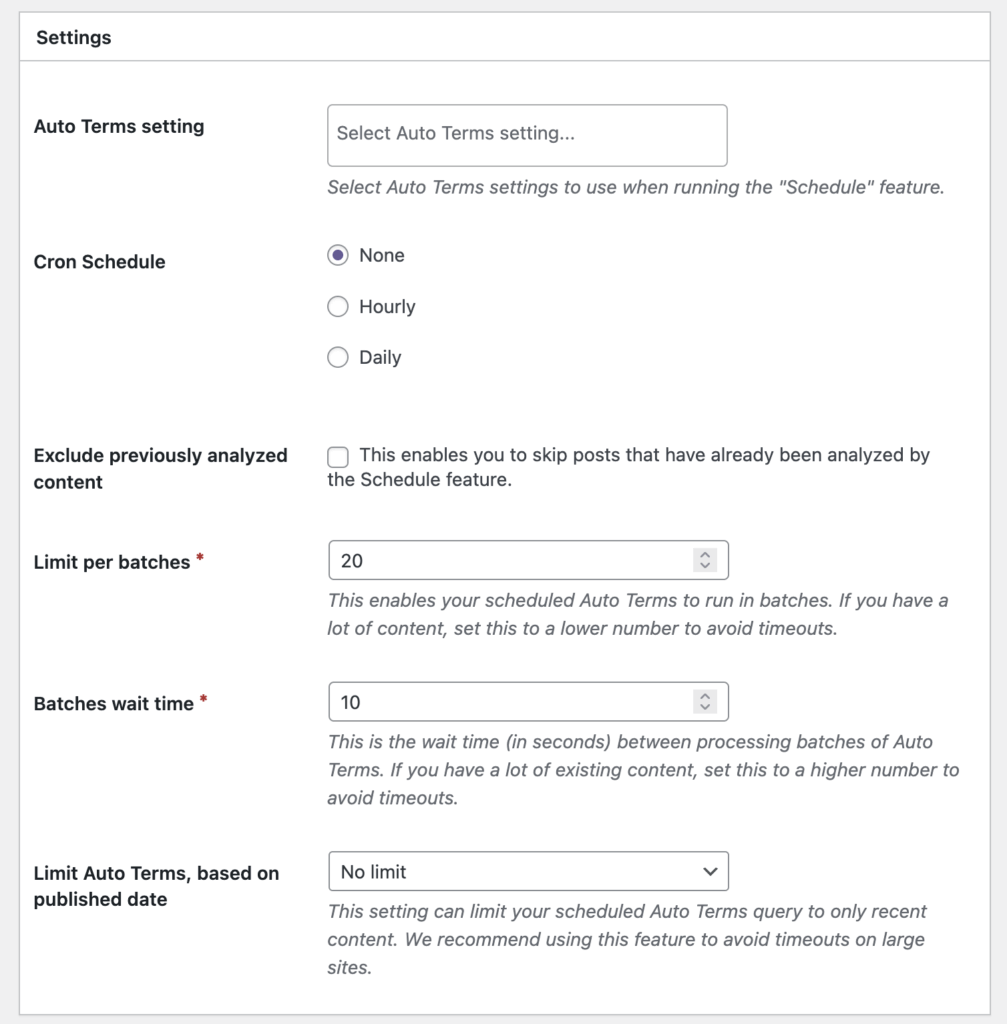
You will find some of these safeguards inside the “Auto Terms” settings in TaxoPress Pro. This image below shows these new safeguards for the “Existing Content“ feature.
- Cron schedule: This allows you to run Auto Terms in the background. If you try to run a large process in the browser, some browsers may for a time out. Enable this feature for large sites.
- Exclude previously analyzed content: This enables you to skip posts that have already been analyzed. Enable this feature for large sites.
- Limit per batches: This enables you to add Auto Terms to content in batches. Set this to a small number for large sites.
- Batches wait time: This is the wait time (in seconds) between processing batches of Auto Terms. Set this to a high number for large sites.
- Limit Auto Terms, based on published date: This setting allows you to add Auto Terms only to recent content. Set this to recent content for large sites