Auto Terms is a TaxoPress feature that automatically adds relevant terms to posts. Using the “Auto Terms Schedule” screen you can automatically run this process every hour or day.
Why schedule Auto Terms? #
Some TaxoPress users rely on Auto Terms Schedule to add terms to posts that are imported. Here are some typical requests:
- “I’m importing posts via the WordPress API and the auto-tagging is not processing on those posts. Can I set this up using a cron job?”
- “How can I add terms when I insert many products in WooCommerce through an external service?”
These situations are the best use of the Auto Terms Schedule feature. When you import new posts, that can require a lot of processing power from your server. First you import and posts and then later you use Auto Terms Schedule to scan those new posts.
How to schedule Auto Terms #
TaxoPress allows you to schedule the Auto Terms feature to run either hourly or daily. TaxoPress users will see a “Schedule” tab, as you can see in the screenshot below. This is really useful if you are regularly updating your posts, or if you’re automatically importing new posts.

This feature will create a cron event in your site. You can see these events using a plugin such as “WP Crontrol”. This screenshot below shows both cron events that are possible with TaxoPress:
taxopress_cron_autoterms_hourly
taxopress_cron_autoterms_daily
On the “Schedule” screen you will be able to see recent results produced by these cron jobs. You can see all the results by visiting the Auto Terms Logs screen.

Safeguards for Large Sites #
If you have a large site (for example, over 50,000 posts) and want to use Auto Terms, we provide some safeguards to help you analyze so much content successfully. These will prevent timeouts if you’re trying to process a lot of content or using an underpowered server.
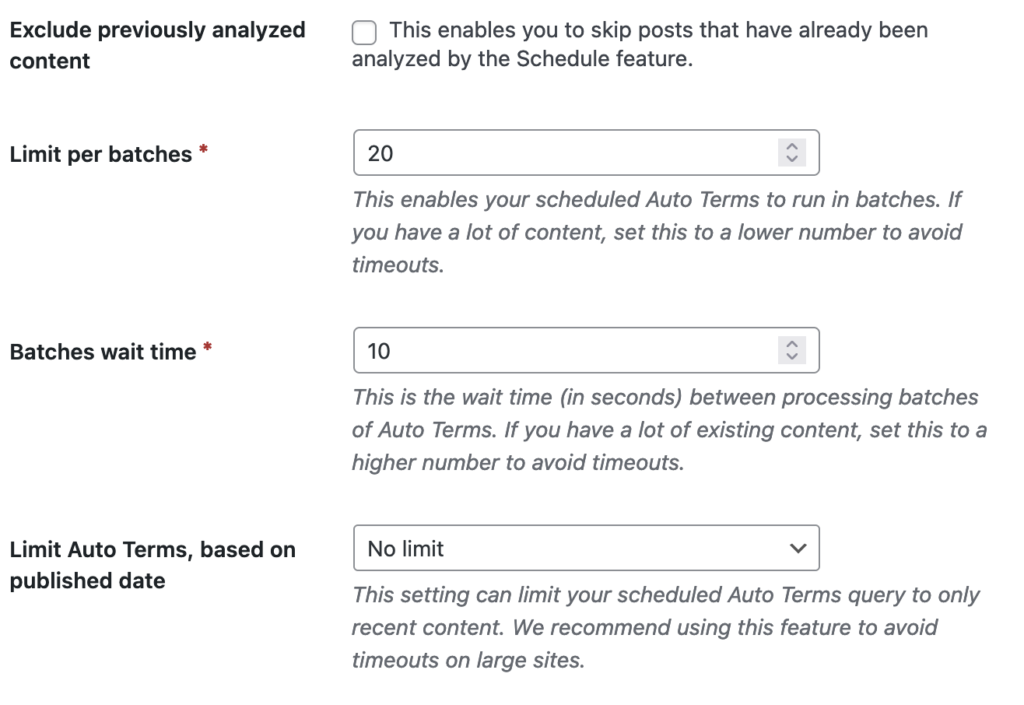
The “Schedule” tab has the following four safeguards:
- Exclude previously analyzed content: This enables you to skip posts that have already been analyzed by the Schedule feature.
- Limit per batches: This enables you to add Auto Terms to content in batches. If you have a lot of content, set this to a lower number to avoid timeouts.
- Batches wait time: This is the wait time (in seconds) between processing batches of Auto Terms. If you have a lot of content, set this to a higher number to avoid timeouts.
- Limit Auto Terms, based on published date: This setting allows you to add Auto Terms only to recent content.