
The Metaboxes screen in the TaxoPress plugin allows you to customize an area that appears for users while editing posts. This feature uses the same metabox you see when editing posts, but you can rapidly move between different posts.
TThis image below shows the Metaboxes screen and it has these features:
- Manage Post Terms: This feature allows you to manage all the terms that are currently attached to a post.
- Show All Existing Terms: This feature allows you to browse all the terms in a taxonomy.
- Auto Terms: This feature allows you to scan your content and suggest relevant terms. The feature can suggest existing terms and also new terms.
- Create Terms: This feature allows you to create new terms that can be added to your posts.
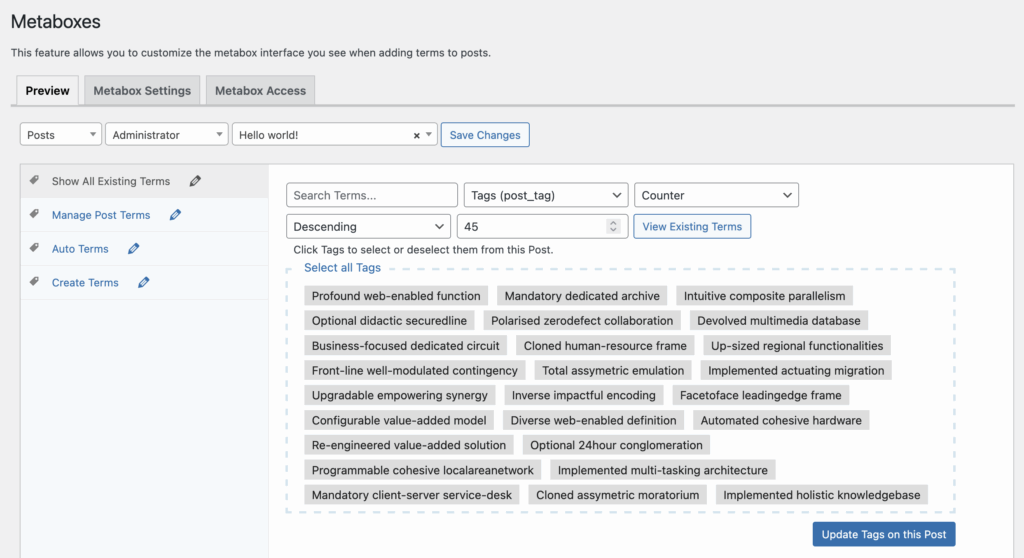
This screen acts as a preview of the metaboxes under each post. You can use these settings to modify the preview and see how the Metaboxes screen will appear for different user roles and on different post types.
