
TaxoPress Pro integrates with OpenAI to scan your content and suggest existing terms. This feature has the ability to customize the prompts used to return results from OpenAI. You can see this in the “OpenAI Prompt” setting:
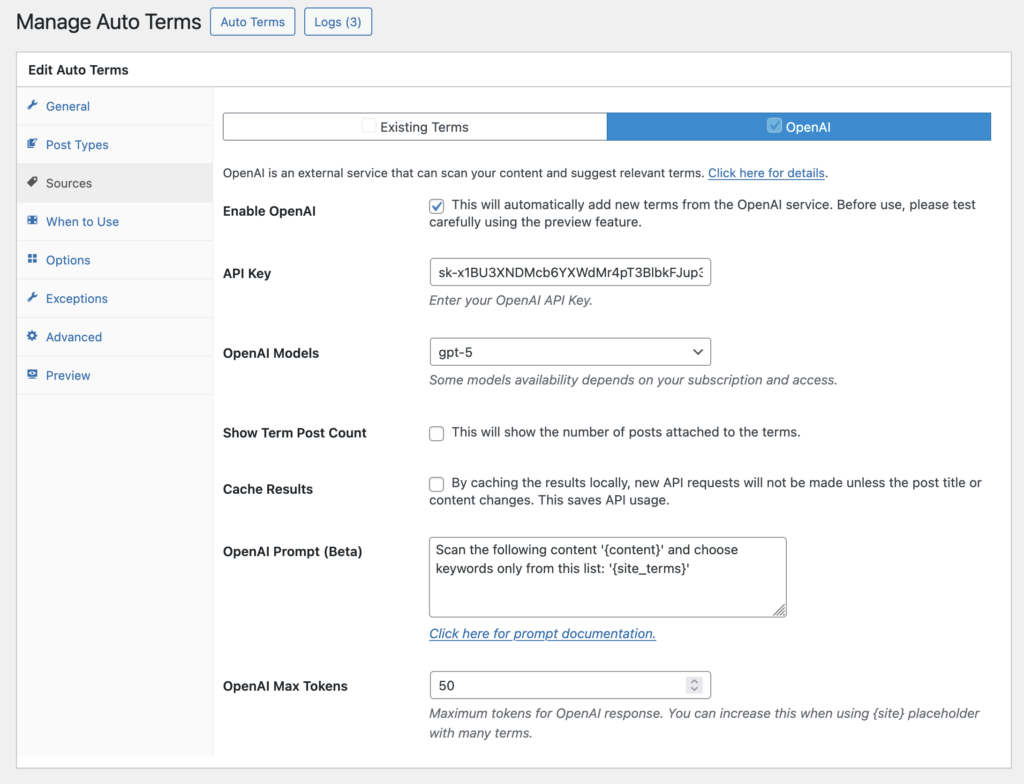
Here are some suggestions for modifying the OpenAI prompt. These are only ideas and OpenAI will accept a wide variety of prompts so feel free to unleash your imagination and test your own use-cases. It’s worth reading the OpenAI documentation on creating prompts.
Sample Prompts #
In these first examples, you can use the prompt to return a maximum or minimum number of terms:
Extract a maximum of 20 tags from the following content: '{content}'Extract a minimum of 30 categories from the following content: '{content}'. OpenAI is very flexible about the phrases used, with the exception of {content} which much be included. For example, these variations will all work.
Extract keywords from the following content: {content}Analyze the following content and extract keywords: {content}Extract keyword from the following content: """{content}"""Ordering the Term Results #
In the next example, you can use prompts to sort the tags in a specific order.
Extract tags from the following content: {content}. Order the tags by alphabetical orderExtract tags from the following content: {content}. Order the tags by popularityChoosing a Language for Term Results #
You can use prompts to specify a language for the terms. This does not have to be the same language as the original content.
Extract tags from the following content: {content}. Make sure all Tags are Spanish dictionary words.Extract tags from the following content: {content}. Make sure all Tags are written in Japanese characters.Exclude Words from Term Results #
You can use prompts to exclude certain words:
Extract tags from the following content: {content}. Do not use the words "WordPress", "Plugins" or "Themes".Extract tags from the following content: {content}. Do not use any curse words.Search Only Existing Terms #
It’s also possible to restrict OpenAI to searching only the existing terms on the site. Use {site_terms} in your prompt as in this example:
Scan the following content '{content}' and choose keywords only from this list: '{site_terms}'Choose a Case for Term Results #
You can add request that OpenAI return results using a specific case. Let’s take the example of the term “TShirts”.
- PascalCase: “…return tags in PascalCase where applicable” : This should return TShirts
- camelCase: “…return tags in camelCase where applicable” : This should return tShirts
- kebab-case : “…return tags in kebab-case where applicable” : This should return T-shirts
- Capital: “…return tags in Tshirts where applicable” : This should return TShirts
- Upper: “…return tags in Uppercase where applicable” : This should return TShirts
- Lower: “…return tags in lowercase where applicable” : This should return TShirts