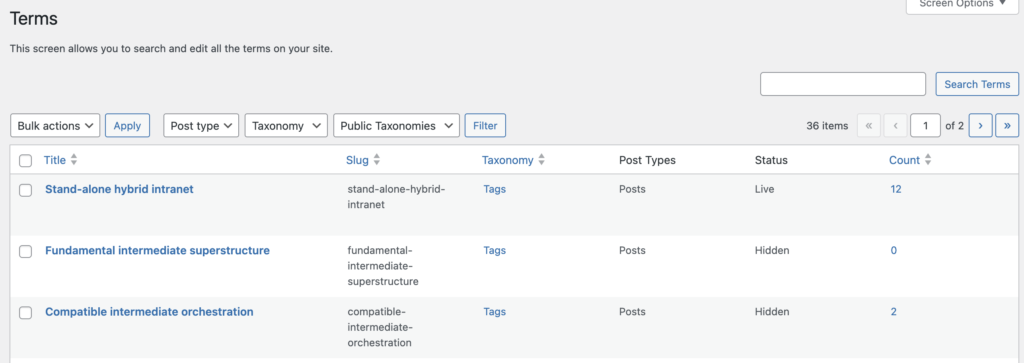
The “Hidden Terms” feature in TaxoPress Pro will hide terms that are infrequently used. This helps remove low-value terms that are not attached to many posts. Having too many unused terms can be a problem for your site’s search engine optimization.
To enable this feature, go to “TaxoPress”, then “Settings” in your WordPress admin menu.
- Click the “Enable Hidden Terms” box and check the box.
- You can also choose the “Minimum Usage for Hidden Terms” option. This will set the minimum number of posts a term must be attached to. If you enter 5, any term used in fewer than 5 posts will be hidden across the site, and its archive page will redirect to the homepage.
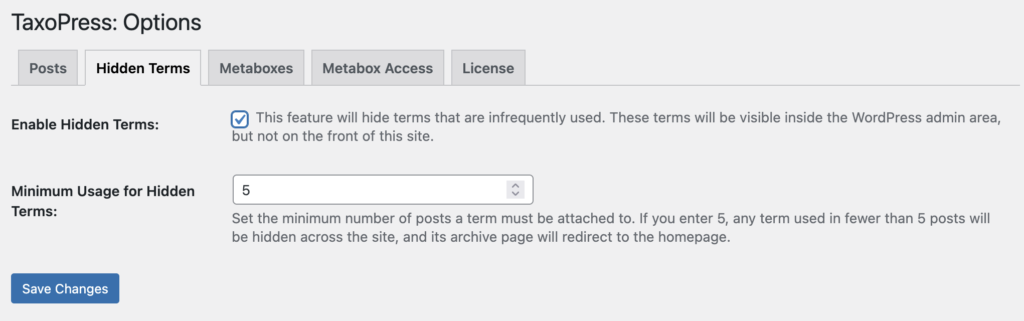
One easy way to see which posts are hidden is go to “TaxoPress” and then “Terms” in your WordPress admin menu. In the screenshot below, you will see terms marked as either “Live” or “Hidden”. Here’s how terms marked as “Hidden” will be treated:
- They will not be show in any displays on the front of your site.
- If you try to access the archive pages for the terms, you will be redirected to your site’s homepage.
This feature will update automatically. So if you choose to hide terms that are used less than 5 times, the term will move to “Live” as soon as it is added to a fifth post.